PrivateContent - Wordpress Plugin - Documentation by LCweb v3.0
“PrivateContent - Wordpress Plugin”
Created: 31/01/2012
Updated: 07/12/2012
By: LCweb
Email: l.montanari@lcweb.it
Thank you for purchasing my plugin. If you have any questions that are beyond the scope of this help file, please feel free to email via my user page contact form here. Thanks so much!
Table of Contents
- Installation
- Manage users
- Import users
- Users private page
- The shortcodes
- Categories limitations
- Login methods
- Registration form
- Hide areas with redirects
- Manage menù item
- Customize messages
- New user options (v3.0)
- Styling the Login
- Advanced Uses
- Localizations
A) Installation - top
B) Manage Users - top
- Disable private page

If enabled, the user private page will be deactivated, showing a warning message that you can customize in PrivateContent Settings->Messages
C) Import Users - top
PRIOR NOTE: The import system is available only if your server has the "allow_url_fopen" enabled.
- CSV structure
-
The import system requires a CSV file with 6 columns. This is the fields order:
name surname username password e-mail telephone - Fields notes
-
- Username and password must be inserted
- Username must be unique
- E-mail must valid
D) Users private page - top
E) The Shortcodes - top
Shortcodes summary:
- [pc-pvt-content][/pc-pvt-content] - private content block, hide the content between the two tags
- [pc-login-form] - insert the login form (is displayed only if user is not logged)
- [pc-logout-box] - insert the logout box (is displayed only if user is logged)
- [pc-registration-form] - insert the registration form
F) Categories limitation - top
G) Login methods - top
PRIOR NOTE: The plugin is designed to let wordpress users overrun the [pc-pvt-content] shortcode limitations. To test it remember to logout first or use the "test mode"!
Login API for developers:
Function to get the login form (is displayed only if user is not logged):
echo pg_login_form();
Function to get the logout box (is displayed only if user is logged):
echo pg_logout_btn();
H) Registration form - top
NOTE: it's possible to customize the message for succesfully registered users. Just go to the plugin settings -> messages, and fill the relative option.
I) Hide areas with redirects - top
J) Manage menu items - top
K) Customize messages - top
L) New options (v3.0) - top
Users Private Page
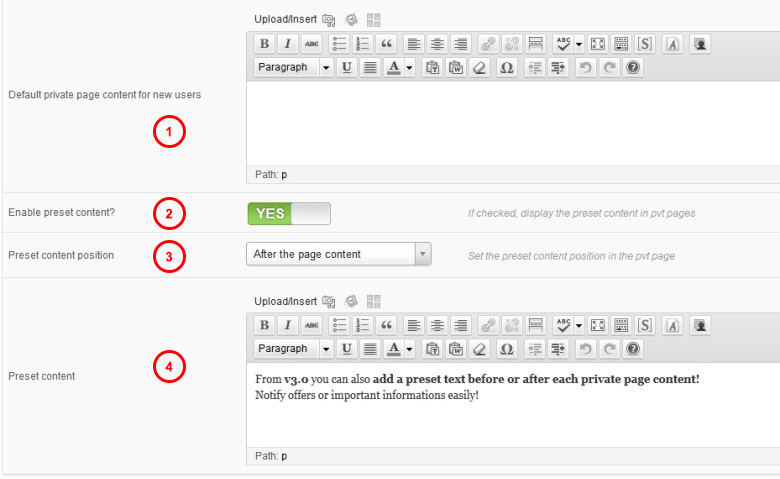
- Default content for new user's private page (1)
-
Set the default content for the private pages. New users private page will have automatically this content.
- Enable preset content (2)
-
Enable it to display a preset text in every private page
- Preset content position (3)
-
Switch to display the preset text before or after the private page content
- Preset content (4)
-
Here you have to insert the preset content. It supports shortcodes and HTML
Redirects
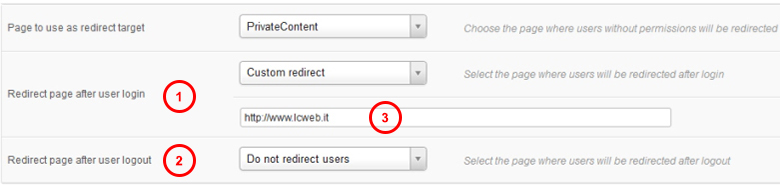
- Redirect after login (1)
-
With this option you can choose if redirect an user after the login. Simply choose the target page and each time an user will log in, will be redirected there.
- Redirect after logout (2)
-
Same behaviour of the login one, but is triggered once a user logs out
- Custom redirects (3)
-
Choosing "custom redirect" a new field will appear where you can specify an URL that will be used by the redirect system
Custom Post types and Taxonomies

You can extend restrictions also to custom taxonomies and post types. Remember that only public taxonomies and public custom post types could be restricted in this way.
Advanced

- Minimum role (1)
-
Restrict the privateContent usage only to a part of the WP users using roles
- Hide Password (2)
-
If enabled change the password field type in the "edit user" page, making them unreadable
- Testing Mode (3)
-
If enabled, WP users won't be able to see private contents until they are loggen with privateContent. Is useful to test restrictions.
M) Styling the Login - top
The plugin has an own basic style for the login form, the messages and the logout box. However to make them fit to your theme you may customize it by creating a new one.
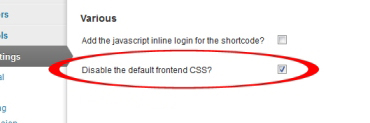
Before testing your style remember to switch off the default, by selecting the relative option in the plugin settings.
This is the basic code: please use its base to make your own:
        /****************************
            MANDATORY ELEMENTS
         *****************************/

        /* cursor for the triggers */
        .pg_trigger, .pg_logout_btn {
            cursor: pointer;
        }
        .pg_login_trig {
            font-weight: bold;
        }

        /* loader style */
        .pg_loading {
            display: inline-block;
            background: url(../img/loader.gif) no-repeat top left transparent;
            width: 20px;
            height: 20px;
        }

        /* loader container */
        .pg_loginform_loader,
        .pcma_loginform_loader,
        .pg_custom_form_loader {
            display: inline-block;
        }
        .pg_loginform_loader span,
        .pcma_loginform_loader span,
        .pg_custom_form_loader span
        .pg_logout_box .pg_loading {
            display: inline-block;
            margin-bottom:-3px;
        }


        /****************************
            WIDGET FORM ELEMENTS
         *****************************/

        /* form label */
        .PrivateContentLogin label {
            display: inline-block;
            min-width: 100px;
            margin-top: 7px;
        }

        /* form input */
        .PrivateContentLogin input[type="text"],
        .PrivateContentLogin input[type="password"] {
            width: 166px;
            padding: 3px;
        }

        /* logout button */
        .widget .pg_logout_btn {
            display: inline-block;
            padding: 2px 4px;
            margin-top: 5px;
        }


        /*********************************
           STANDARD LOGIN FORM ELEMENTS
         ********************************/

        /* container */
        .pg_login_block {
            margin: 20px 0;
        }

        /* container message */
        .pg_login_block p {
            padding: 5px 10px;
            border-radius: 4px;
            background-color: #FDFFDD;
            border: 1px solid #ddd;
            margin: 0;
            border: 1px solid #EEE78A;
        }

         /* form tag */
        .pg_inline_login_form {
            display: inline-block;
            width: 290px;
            padding: 17px;
            border: 1px solid #D3D3D3;
            background-color: #F4F4F4;
            box-shadow:0px 0px 7px rgb(190,190,190);
            border-radius: 4px;
        }
        .pg_inline_login_form {
            margin: 0 auto 30px;
        }

        /* label*/
        .pg_inline_login_form label,
        .pg_inline_login_form .pcma_psw_recovery_wrap label {
            display: inline-block;
            width: 90px;
            padding-right: 10px;
            margin-bottom: 15px;
        }

        /* text inputs */
        .pg_inline_login_form input[type="text"],
        .pg_inline_login_form input[type="password"],
        .pg_inline_login_form .pcma_psw_recovery_wrap input[type="text"],
        .pg_inline_login_form .pcma_psw_recovery_wrap input[type="password"] {
            padding: 3px;
            width: 166px;
        }


        /*********************************
                  LOGOUT BOX
         ********************************/
        .pg_logout_box {
            display: inline-block;
            padding: 2px 5px;
            border: 1px solid #D3D3D3;
            background-color: #F4F4F4;
            border-radius: 3px;
        }
        .pg_logout_box .pg_loading {
            position: relative;
            margin-bottom: -5px;
            margin-left: 3px;
        }


        /************************************************
           COMMON REGISTRATION AND CUSTOM FORM ELEMENTS
         ***********************************************/

        /* form wrapper style */
        .pg_registration_form,
        .pg_custom_form {
            display: inline-block;
            margin: 0 auto 30px;
            width: 335px;
            padding: 17px;
            border: 1px solid #D3D3D3;
            background-color: #F4F4F4;
            box-shadow:0px 0px 7px rgb(190,190,190);
            border-radius: 4px;
        }

        /* required */
        .pg_req_field {
            color: #F30;
        }

        /* form field list */
        .pg_form_flist {
            list-style: none !important;
            margin: 0;
            padding: 0;
            clear: both;
        }
        .pg_form_flist li {
            padding: 0;
            margin: 0 15px 15px 0;
            max-width: 320px;
            list-style: none !important;
        }

        /* label */
        .pg_form_flist li > label {
            display: inline-block;
            padding: 3px 10px 0 0;
            max-width: 130px;
        }
        .pg_textarea_label {
            padding-right: 10px;
            width: auto;
        }
        label.pg_textarea_label {
            display: block;
            margin: 0;
            padding: 0;
            width: auto;
        }

        /* checkbox wrapper */
        .pg_check_wrap {
            float: right;
            width: 176px;
        }

        /* checkbox label */
        .pg_check_wrap .pg_check_label {
            display: inline-block;
            width: 152px;
            margin: 0;
            padding: 0;
        }

        /* single checkbox */
        .pg_check_wrap input {
            vertical-align: top;
            margin: 5px 4px 0 3px;
        }

        /* input, select and textarea format */
        .pg_form_flist input[type=text],
        .pg_form_flist input[type=password],
        .pg_form_flist select {
            width: 166px;
            padding: 3px;
            box-sizing: content-box;
            -ms-box-sizing:content-box;
            -moz-box-sizing:content-box;
            -webkit-box-sizing:content-box;
            border: 1px solid #ddd;
            float: right;
            margin: 0;
        }
        .pg_form_flist textarea {
            width: 314px;
            min-height: 65px;
            border: 1px solid #ddd;
            padding: 3px;
        }

        /* loader */
        .pg_registration_form .pg_loginform_loader {
            margin-left: 4px;
        }
        .pg_registration_form .pg_loginform_loader .pg_loading {
            margin-bottom: -5px;
        }


        /****************************
           SUCCESS AND ERROR MESSAGES
         *****************************/

        /* standard form messages */
        .pg_error_mess,
        .pg_success_mess {
            display: block;
            color: #444;
            padding: 3px 5px;
            border-radius: 3px;
            margin-bottom: 7px;
            font-size: 85%;
        }

        /* widget form messages */
        .widget .pg_error_mess,
        .widget .pg_success_mess {
            display: block;
            color: #444;
            padding: 2px 3px;
            border-radius: 2px;
            margin-bottom: 7px;
            margin-top: 7px;
            font-size: 95%;
            max-width: 168px;
        }

        /* messages color */
        .pg_error_mess {
            border: 1px solid #FFA6A6;
            background-color: #FFCACA;
        }
        .pg_success_mess {
            background-color: #EAF5DC;
            border: 1px solid #BFE098;
        }


        /*********************************
           MAIL ACTIONS ADD-ON ELEMENTS
         ********************************/

        /* show and hide recovery form trigger */
        .pcma_psw_recovery_trigger,
        .pcma_del_recovery {
            font-size: 11px;
            cursor: pointer;
            color: #21759B;
        }
        .pcma_psw_recovery_trigger:hover,
        .pcma_del_recovery:hover {
            color: #D54E21;
        }

        /* widget rule for the button position */
        .PrivateContentLogin .pcma_psw_recovery_message {
            min-height: 15px;
        }
N) Advanced Uses - top
The plugin comes with some API functions that allow wordpress webmasters to extend to each part of your wordpress theme the user-level authorisation system. Here the list:
- pg_user_logged() - check is an user is logged.
If not logged - return FALSE
If logged return an object with the user data:- name
- surname
- username
- tel (telephone)
- page_id (the post id assigned to that user)
- disable_pvt_page (return 1 if the user not have the private page, else return 0)
- pg_user_check($allowed = 'all') - check is an user has the right permissions.
parameter $allowed- all = the user have to be in any category to have the access
- category ID list (ID,ID,ID) = the user have to be in one of the categories to have the access
If not logged - return FALSE
If loggeb but not have permissions - return 2
If logged - return 1 - get_nl_message() - get the default message for "user non logged"
- get_uca_message() - get the default message for "user not have right permissions"
- pg_login_form() - get the login form
- pg_logout_btn($code = '') - get the logout button
parameter $code- if empty - return the default code
Logout
- else = override the default code, remember to use the pg_logout_btn as trigger class
- if empty - return the default code
- pg_logout() - log out the current user destroying the session
- pg_registration_form() - get the registration form
O) Localizations - top
From v2.2 PrivateContent is translation ready. If a translation of your language has been created, Wordpress will automatically switch between languages.
Create a translationIn the plugin package that you have downloaded from Codecanyon there is a folder called "translation template" with the the default.pot file. It contains all the english elements that have to be translated. If you want to create one in your language follow this steps:
- Open the default.po file with POedit
- Modify the Catalog by inserting your data and the translation language
- Save the file with the i18n identifier of your language and the prefix "pg_ml-" (the italian example is pg_ml-it_IT)
- Go to the plugin folder ".. wp-content/plugins/private-content/lang" and paste the .po and .mo files that POedit has created
If everything goes right, you will be able to use your translation.
If you create new translations, please, contact me at l.montanari@lcweb.it sending the .PO and .MO files.
I will put it in the new releases and mention you in the changelog. Thanks
Existing Localizations:
- Italian
- 100% translated
- Dutch
- Traslated until v2.3
- Brazilian
- Traslated until v2.3
- Turkish
- Traslated until v2.3
Once again, thank you so much for purchasing my plugin. As I said at the beginning, I'd be glad to help you if you have any questions relating to this theme. No guarantees, but I'll do my best to assist. If you have a more general question relating to the PHP scripts on Codecanyon, you might consider visiting the forums and asking your question in the "Item Discussion" section.
